The model wants a visual brief, not a keyword pile.
Black Forest Labs recommends a simple backbone: subject, action, style, and context. That structure is especially useful when you begin with a reference because it forces you to separate what the source contains from how it looks.
Write naturally. Start with the main visual fact, explain the scene around it, then add composition, light, material, color, and style. The result can read like a short art direction brief rather than a comma-separated inventory.
Describe the intended result positively. FLUX.2 does not use a separate negative prompt. Replace a vague exclusion such as “no clutter” with a visible instruction such as “an empty corridor with clean walls and one umbrella.”
Reduce the image to four layers.
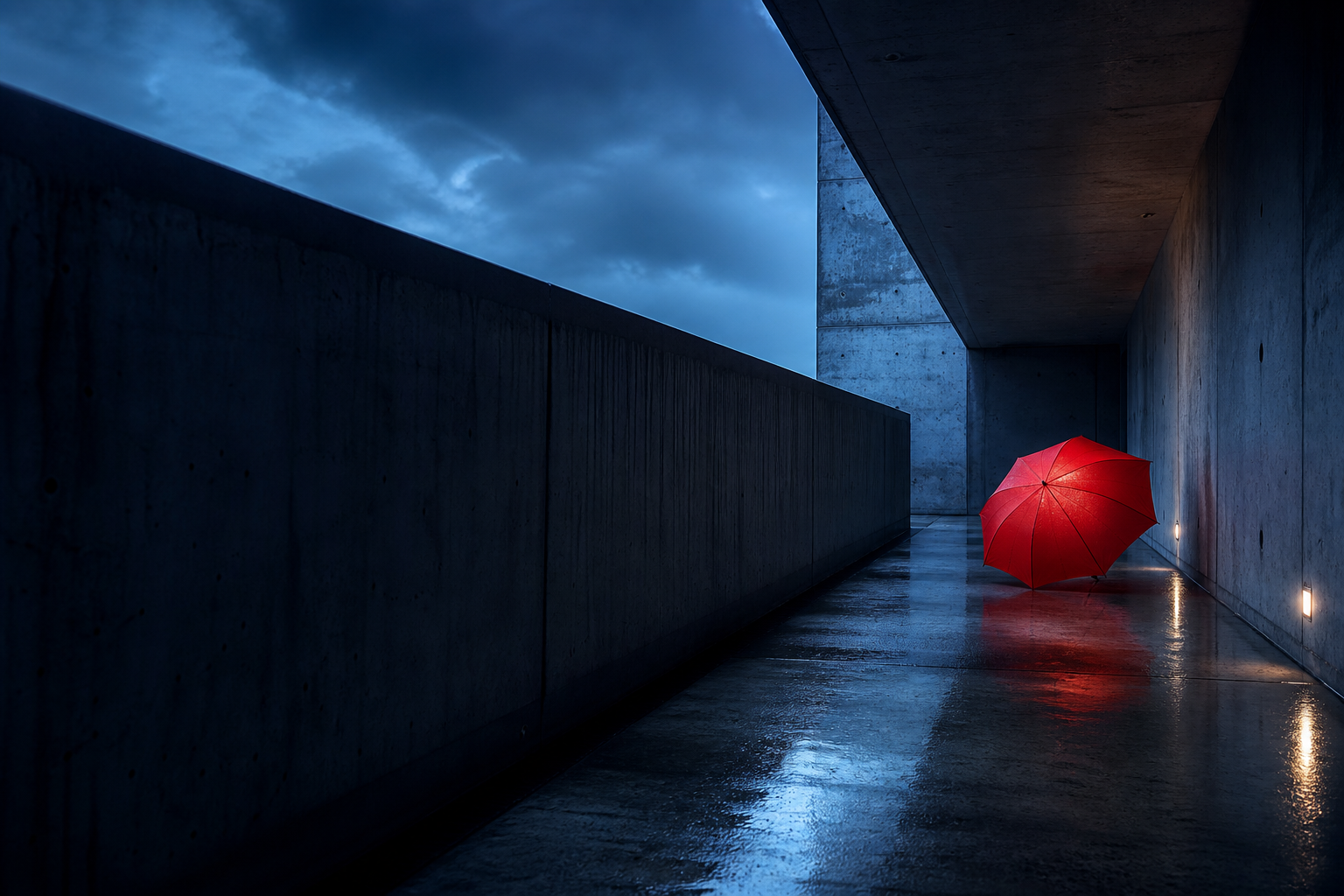
Before writing, decide which parts of the reference create its identity. In the corridor scene, the umbrella is memorable, but the frame would feel completely different without its long vanishing point and blue-hour light.
A single vermilion umbrella leaning against a raw concrete wall.
The umbrella is closed and still; the passage is empty after rain.
Cinematic architectural photography with restrained color and realistic wet surfaces.
A brutalist corridor at blue hour, seen from a low eye level with a deep central vanishing point.
Add only the secondary details that control the result: reflective pavement, cool ambient light, soft mist, hard geometric lines, and a single warm accent. Every phrase should point to something that could be seen in the output.
Build from scene to treatment.
The order does not have to be rigid, but it should be easy to edit. Lead with the subject and scene. Follow with composition and light. Finish with surface qualities, palette, style, and any output constraint.
moody cinematic hallway, red umbrella, brutalist, beautiful lighting
A single closed vermilion umbrella leans against the left wall of an empty brutalist concrete passage after rain. Wide architectural view from a low eye level, strong central vanishing point, reflective wet pavement, cool blue-hour ambient light, soft mist at the far opening, realistic concrete texture, restrained cinematic color, quiet tension.
The second version gives each style word a visible consequence. “Cinematic” is supported by the framing, contrast, atmosphere, and color rather than left as a general mood label.
If you are editing, separate change from preservation.
Tell the model exactly what should change and what should remain stable. A precise edit instruction is more useful than rewriting the entire scene from scratch.
Change the closed umbrella from vermilion red to deep cobalt blue. Keep the umbrella in the same position and preserve the original corridor geometry, camera angle, crop, wet pavement reflections, blue-hour lighting, concrete texture, and empty atmosphere. The new blue fabric should respond naturally to the existing cool light.
Give every reference image one job.
When using one reference, state whether it controls the subject, composition, style, or all three. When using several, label the role of each input in plain language. This prevents a style source from accidentally replacing the subject or a subject source from taking over the background.
Image 1: subject
Use the umbrella shape, fabric construction, and exact handle design from Image 1.
Image 2: environment
Place it in the concrete corridor and follow the perspective shown in Image 2.
Image 3: style
Use the cool palette, atmospheric haze, and restrained contrast from Image 3.
Final relationship
Explain how the subject belongs in the new scene, including scale, contact shadow, light, and occlusion.
For complex production work, structured JSON is also available. Natural language is still the clearest starting point for a single reference or a focused edit.
A complete reference-to-model workflow
Turning a visual reference into a usable brief is not the same as writing a caption. A caption tells someone what is present. A generation instruction ranks the decisions that need to survive and explains how those decisions relate to one another.
- Define the target. Decide whether you want a close reconstruction, a new scene with the same art direction, a style transfer, or a focused edit. The same source needs different language for each goal.
- Identify the anchor. Choose the one feature that must dominate the output. It may be a person, product, building, silhouette, color relationship, or composition rather than the most visually detailed object.
- Map spatial relationships. Note where the anchor sits, what surrounds it, which direction it faces, how large it is in the frame, and what overlaps or recedes behind it.
- Translate appearance into visible traits. Replace broad labels with evidence. Instead of “dramatic,” describe low-key side light, deep shadow, a bright rim, and a narrow warm accent.
- State constraints positively. Define an uncluttered background, a single centered object, clean edges, or uninterrupted negative space rather than relying on a long list of things to avoid.
- Generate and revise one layer at a time. Fix composition before refining texture. Fix identity before changing atmosphere. This makes each revision easier to evaluate.
Rank information by visual importance. If the perspective and lighting define the reference more strongly than the small objects in the scene, give the perspective and lighting more space in the prompt.
Choose the right instruction type.
“Turn this reference into a prompt” can describe several different tasks. Name the task first so the model knows how much freedom it has.
Reconstruct the reference
Create a close reconstruction of the attached reference. Preserve the subject, layout, viewpoint, light direction, palette, and material behavior. Describe small details only when they affect recognition.
Keep the composition, change the content
Use the attached image as a composition reference. Keep the crop, camera height, negative space, and major shapes, then state the new subject and environment in direct visual language.
Keep the content, change the style
Preserve the subject and scene from the attached image. Replace the rendering treatment with a named medium plus visible traits such as edge quality, palette, texture, depth, and finish.
Make a surgical edit
Change only [target element] to [new state]. Follow it with the exact geometry, identity, lighting, layout, and surrounding objects that must remain unchanged.
For a new generation, describe the entire intended frame because the reference acts as guidance. For an edit, spend more words on the boundary between what may change and what must remain stable. This distinction prevents a small request from becoming an unintended redesign.
Common FLUX.2 prompt mistakes
Listing nouns without relationships
“Umbrella, corridor, concrete, rain” names ingredients but does not explain the composition. State that the closed umbrella leans against the left wall, that the corridor recedes toward a central opening, and that the wet floor reflects the light.
Combining styles that imply different rendering rules
A prompt that asks for flat vector art, photoreal materials, watercolor edges, and glossy 3D lighting gives the model competing instructions. Choose one primary medium, then borrow only compatible traits from other references.
Using mood words as a substitute for lighting
Words such as epic, beautiful, mysterious, and premium are subjective. Translate them into a frame, palette, contrast pattern, material finish, or lighting setup that can be rendered.
Overdescribing details that do not matter
A long brief can be useful, but length alone does not produce control. Remove repeated adjectives and details that cannot be seen at the intended crop. Keep the information that changes recognition, composition, or art direction.
Leaving reference roles implicit
When several references are attached, the model should not have to guess which face, product, location, or texture is authoritative. Label each input and describe the final relationship between them.
Review the prompt for contradictions.
- Can the first sentence identify the main subject and scene?
- Does the prompt describe a visible action or state?
- Are composition and camera position clear?
- Do the lighting, palette, material, and style instructions agree?
- Are exclusions rewritten as positive visual instructions?
- For an edit, is the change separate from the preserve list?
- For multiple inputs, does every reference have a defined role?
FLUX.2 prompt FAQ
What is the best structure for a FLUX.2 prompt?
Start with the subject and its action or state, place it in context, describe the composition, then add lighting, materials, color, style, and necessary constraints. This mirrors the subject + action + style + context structure while keeping the prompt easy to revise.
Does FLUX.2 use negative prompts?
FLUX.2 does not use a separate negative prompt. Describe the intended result positively in the main instruction. “A clean empty background with one centered product” is more actionable than a long list of unwanted objects.
How should I use several reference images with FLUX.2?
Label each reference and give it a specific role such as subject, environment, composition, or style. Then explain how the inputs combine, including scale, position, perspective, lighting, shadows, and material interaction.
How long should a FLUX.2 prompt be?
It should be long enough to define the important visual decisions but short enough that every phrase has a clear job. A focused 80-word brief can outperform a 300-word prompt full of repeated mood adjectives.
Should I use JSON or natural language for FLUX.2?
Natural language is the clearest starting point for most generations and focused edits. Structured JSON becomes useful when a complex production workflow needs named fields, repeatable templates, or many reference roles.