Nano Banana 2 is built for visual conversation.
Nano Banana 2 is Google's current general-purpose image model, officially listed as Gemini 3.1 Flash Image. It supports text and image input, so a prompt can refer to the attached image directly and request a generation, transformation, composition, or focused edit.
This changes how you should write. If the reference already establishes the scene, do not spend the whole prompt describing what the model can see. Use your words to explain your intent and protect the parts that matter.
Write the relationship to the image first. “Edit this image,” “use this as the composition reference,” and “keep the subject but change the setting” lead to different jobs. State the job before adding visual detail.
Give the prompt five clear parts.
A reliable Nano Banana 2 prompt can be read as a short conversation: identify the task, name the change, lock the stable elements, explain how the edit integrates, then define the intended output.
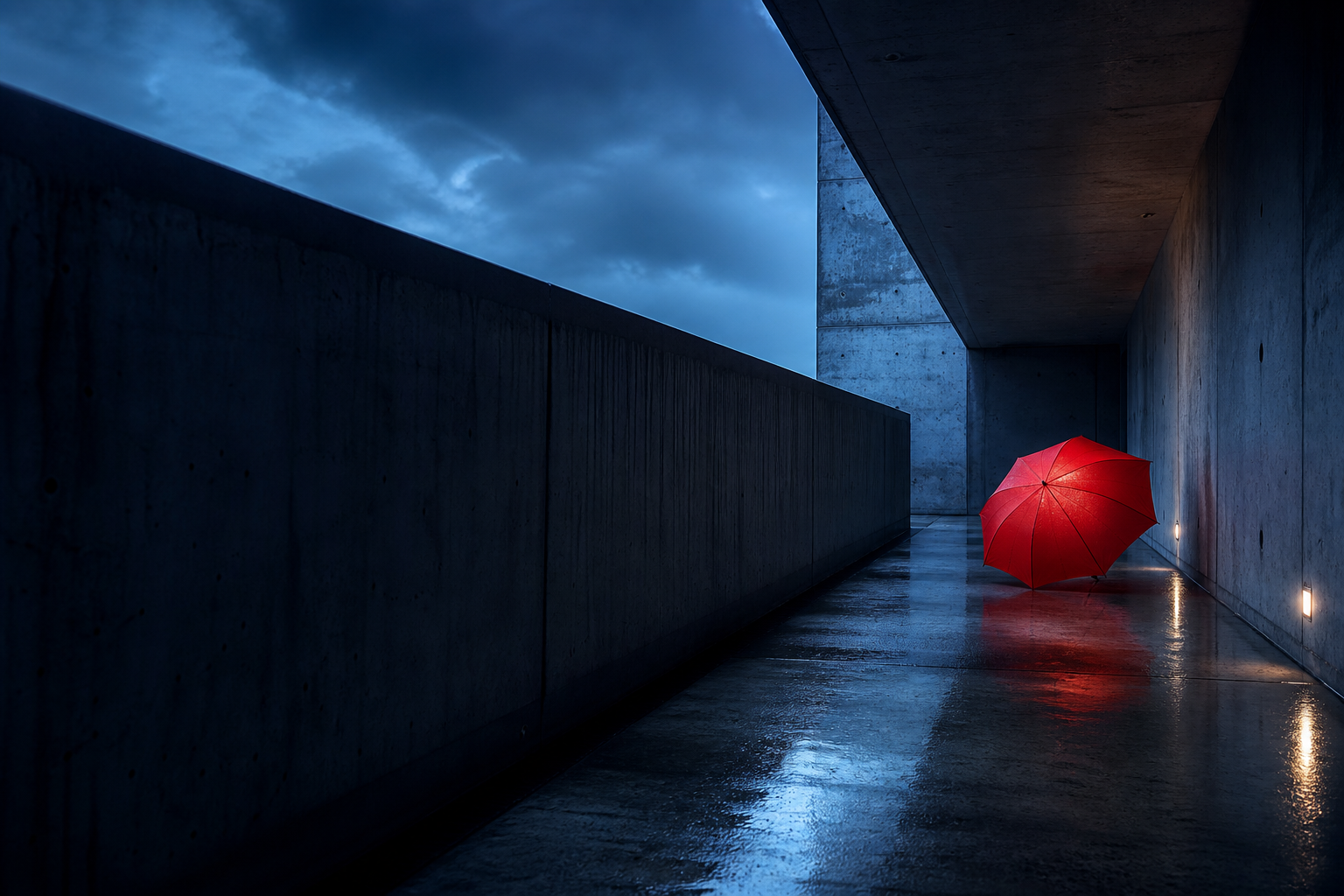
Edit the attached corridor photograph rather than creating an unrelated new scene.
Replace the red umbrella with a small cobalt-blue bicycle leaning against the same wall.
Keep the corridor, viewpoint, crop, wet floor, blue-hour light, and empty atmosphere unchanged.
Match the bicycle scale, contact shadow, reflections, perspective, and cool color temperature to the photograph.
Produce a realistic landscape image with no added text, people, or logos.
Edit the attached corridor photograph. Replace only the red umbrella with a small cobalt-blue city bicycle leaning against the same section of wall. Keep the brutalist corridor, camera position, crop, central vanishing point, wet pavement, concrete texture, blue-hour lighting, and empty atmosphere exactly the same. Match the bicycle to the existing perspective and scale, add a natural contact shadow and subtle reflection on the wet floor, and let the cool ambient light affect its paint and metal surfaces. Keep the result photorealistic. Do not add people, text, logos, or other objects.
Use a preserve list to stop visual drift.
Google's guidance for targeted edits is direct: describe the specific element to change, then ask the model to keep everything else the same. A preserve list makes “everything else” concrete when identity, layout, or art direction cannot move.
Make the umbrella blue and more stylish.
Change only the umbrella fabric from red to matte cobalt blue. Preserve its exact shape, size, position, handle, perspective, and shadow. Keep every other part of the photograph unchanged.
For people, preserve identity, expression, pose, body proportions, hair, and skin tone when they matter. For products, preserve geometry, label content, material finish, and camera angle. For layouts, preserve placement, spacing, hierarchy, and existing text.
Describe integration, not just replacement.
A pasted-looking edit usually lacks instructions about the relationship between old and new. Name the light direction, shadow behavior, reflections, scale, perspective, occlusion, and color temperature that should connect the inserted element to the scene.
A complete Nano Banana 2 workflow
The most reliable workflow begins before you write the final prompt. Decide which visual facts come from the uploaded image and which decisions you want the model to make. This prevents the model from treating a source image as either completely fixed or completely disposable.
- Name the job. Say whether you want to edit the uploaded image, create a new image based on its composition, transfer its style, combine it with other references, or extend it into a new aspect ratio.
- Choose the editable region. Identify the person, product, background, garment, text area, or object that may change. Use location language when there are repeated elements.
- Write the preserve list. Protect the features that establish identity and continuity. Include camera angle, crop, pose, face, product geometry, layout, palette, or lighting only when they matter.
- Describe the new state. Explain the replacement or transformation using visible attributes such as form, material, color, position, texture, and scale.
- Explain integration. Tell the model how the new element should inherit perspective, light, contact shadows, reflections, depth, and color from the base scene.
- Set the output boundary. State orientation, realism level, exact text, background behavior, or exclusions that affect the intended use.
Make the editable boundary obvious. Nano Banana 2 is capable of broad reinterpretation, so a focused edit should explicitly define the small region that may change and the larger region that must not.
Decide what each reference controls.
A reference image can contribute content, identity, layout, style, or environment. Those are different types of evidence. If the prompt does not name the intended role, the model may preserve the wrong feature or blend inputs too freely.
Base image
The canvas being edited. Protect its crop, camera position, lighting, and unchanged regions.
Identity reference
A face, character, product, or branded object whose recognizable geometry and details must remain consistent.
Composition reference
A guide for framing, subject placement, negative space, perspective, and the balance of large shapes.
Style reference
A source for palette, texture, rendering treatment, line quality, light behavior, or final surface finish.
Object reference
A specific garment, package, vehicle, prop, or material that should be inserted without redesign.
Environment reference
A location or background whose architecture, atmosphere, season, and lighting establish the scene.
For multiple inputs, label them in the order they are attached. A useful instruction might say: “Use Image 1 as the base portrait, the jacket from Image 2 as the exact garment reference, and only the warm studio lighting from Image 3.” Finish by explaining how the garment fits the pose and how the new light affects the face and fabric.
Nano Banana 2 prompt templates by task
Templates are most useful as checklists. Replace every bracketed phrase with a concrete visual decision and delete any line that does not apply.
Focused object replacement
Edit the attached image. Replace only [object and location] with [new object]. Preserve [composition, camera, background, lighting, identity]. Match the new object to the existing [scale, perspective, shadow, reflection, color temperature].
Style transfer without redesign
Keep the exact subject, pose, composition, and scene from the attached image. Change only the rendering treatment to [medium and style traits]. Preserve recognizable identity and do not add or remove scene elements.
Product campaign variation
Use the product in Image 1 without changing its shape, label, colors, or proportions. Place it in [new environment] using [camera and lighting]. Keep the label legible and integrate realistic contact shadows and reflections.
Composition-led new image
Use the attached image only as a composition reference. Keep [crop, viewpoint, subject placement, negative space], but create a new scene showing [subject, action, setting] in [style, light, palette].
Exact text replacement
Replace only the text “[old copy]” with “[new copy]”. Preserve the original type style, size, color, alignment, spacing, perspective, and layout. Do not alter logos, icons, imagery, or any other words.
Make one follow-up change at a time.
Nano Banana 2 supports conversational refinement. Once the first result is close, short follow-up prompts are easier to diagnose than a complete rewrite. Keep the established image and ask for one measurable change.
Adjust light
Keep everything else unchanged. Make the far opening slightly brighter and preserve the cool blue-hour color.
Restore a detail
Restore the original concrete texture on the left wall. Do not alter the bicycle or composition.
Change one material
Change only the bicycle seat to worn brown leather with realistic grain and stitching.
Protect the frame
Keep the exact camera angle and crop. Add a little more mist only at the far end of the corridor.
If a critical detail starts drifting, repeat its preserve instruction in the next turn. Conversation gives you continuity, but important constraints should not rely on memory alone.
Common Nano Banana 2 prompt mistakes
Describing the image but not the task
A detailed caption does not tell the model whether to recreate, edit, restyle, or borrow composition. Open with an action that defines the relationship to the uploaded image.
Using “keep it the same” without naming what matters
The model may interpret sameness broadly. Replace that phrase with a short list of protected features such as face, pose, crop, product geometry, label, camera angle, lighting, and background.
Requesting a replacement without integration
Adding an object is not finished when the object appears. The result also needs plausible scale, perspective, contact, occlusion, shadow, reflection, and local color response.
Changing several layers in one follow-up
If you alter the subject, crop, style, light, and background at once, it becomes difficult to know which instruction caused drift. Use one focused follow-up, inspect the result, and then continue.
Letting exact text remain implied
Put required words in quotation marks. State whether the copy should replace existing text or be added, where it belongs, how it should be typeset, and that no extra characters should appear.
Review the prompt as an edit request.
- Does the first sentence say whether to edit, restyle, compose, or regenerate?
- Is the requested change specific enough to locate in the image?
- Does the preserve list name the identity, layout, or style signals that matter?
- Have you explained how the new element fits the existing light and geometry?
- Are output requirements such as orientation, text, and exclusions clear?
- Can the next iteration be expressed as one small change?
Nano Banana 2 prompt FAQ
What is the official name of Nano Banana 2?
Nano Banana 2 is the product name for Gemini 3.1 Flash Image, Google's current general-purpose image generation and editing model. Using both names once in the article helps readers connect the product name with the official model listing.
How do I write a Nano Banana 2 image editing prompt?
State the editing task, identify the exact change, list what must stay unchanged, describe how the edit integrates with the scene, and define the output requirements. For a surgical edit, use “change only” and a precise preserve list.
Do I need to describe an attached image in full?
No. Describe the reference features that matter to your goal and use the prompt to explain what should change, what should remain, and how much creative freedom the model has. Repeating every visible object can hide the actual request.
Can Nano Banana 2 combine multiple reference images?
Yes. Assign each input a role such as base scene, subject, product, layout, or style. Explain how the final composition combines them and which source is authoritative when details conflict.
How should I refine a Nano Banana 2 result?
Use short follow-up prompts that change one measurable detail at a time. If an important feature begins to drift, restate the relevant preservation instructions before requesting the next change.